NGE/3P Data Sharing
Agencies/Data Request (DR) owners will need to create the data request on NGE/3P's behalf.
As a data requester making a DR submission for onward sharing to NGE/3P, you are responsible (as the Data Controller) for ensuring that the request is legitimate.
Overview
Q: What are Non-Government Entities (NGE) and 3rd Parties (3P) and how can they subscribe to data under the Government Data Architecture (GDA)?
The data sharing flows in DataHive are based on the Government Data Architecture Framework and governed by the Public Sector Governance Act (PSGA) 2018. Both NGEs and 3Ps are non-PSGA covered entities. NGE are public entities that do not fall within the PSGA 2018 purview, such as Research Institutes (RIs), Institutes of Higher Learning (IHLs) and/or fully owned subsidiaries of Public Sector Agencies. Examples include: DSO / A-Star research entities (RIs), NUS/NTU/SMU (IHLs), and MOHH/PSA/EZ-link (govt-owned subsidiaries). 3P are other entities in the private sector. Data distribution is now extended to such entities through the revised flow.
Roles & responsibilities
Q: What are the Requestor’s and NGE/3P’s responsibilities?
The Requestor (acting as the “Data Controller”) shall ensure that the NGE/3P agree to the Terms of Use of data specified in IM8/IT Mgmt/Data-Access-and-Distribution Cl 3.5/S1 before data is disclosed.
The Requestor shall also ensure that it is legal to disclose the data to the NGE/3P.
Q: What is a “Data Controller”?
A Data Controller is responsible for controlling the onward sharing of the requested datasets to NGE/3P, and must accept the responsibilities specified in IM8/IT Mgmt/Data-Access-and-Distribution Cl 2.2/S3 before data distribution.
Guidelines for making a data request with NGE/3P data sharing
Q: How should I fill in the Data Request Form if I want to onward share the data to a NGE/3P?
In the Onward Data Sharing section, answer NGE/3P to "Will the results or data be provided to any other agency or Non-Government Entity (NGE) / 3rd Party (3P)?". Then give the legal ground for the onward sharing, answer whether you require DataHive to share the data on your behalf, and complete the Details of NGE/3P fields.
If DataHive is sharing the data for you, fill in the public key and IPv4 address / address range fields within that section so DataHive can auto-provision the data. Details put elsewhere (e.g. Purpose, Additional requirements) cannot be picked up by the platform. A request expiry date is also required, so the NGE/3P's access can be withdrawn when the data request ends.
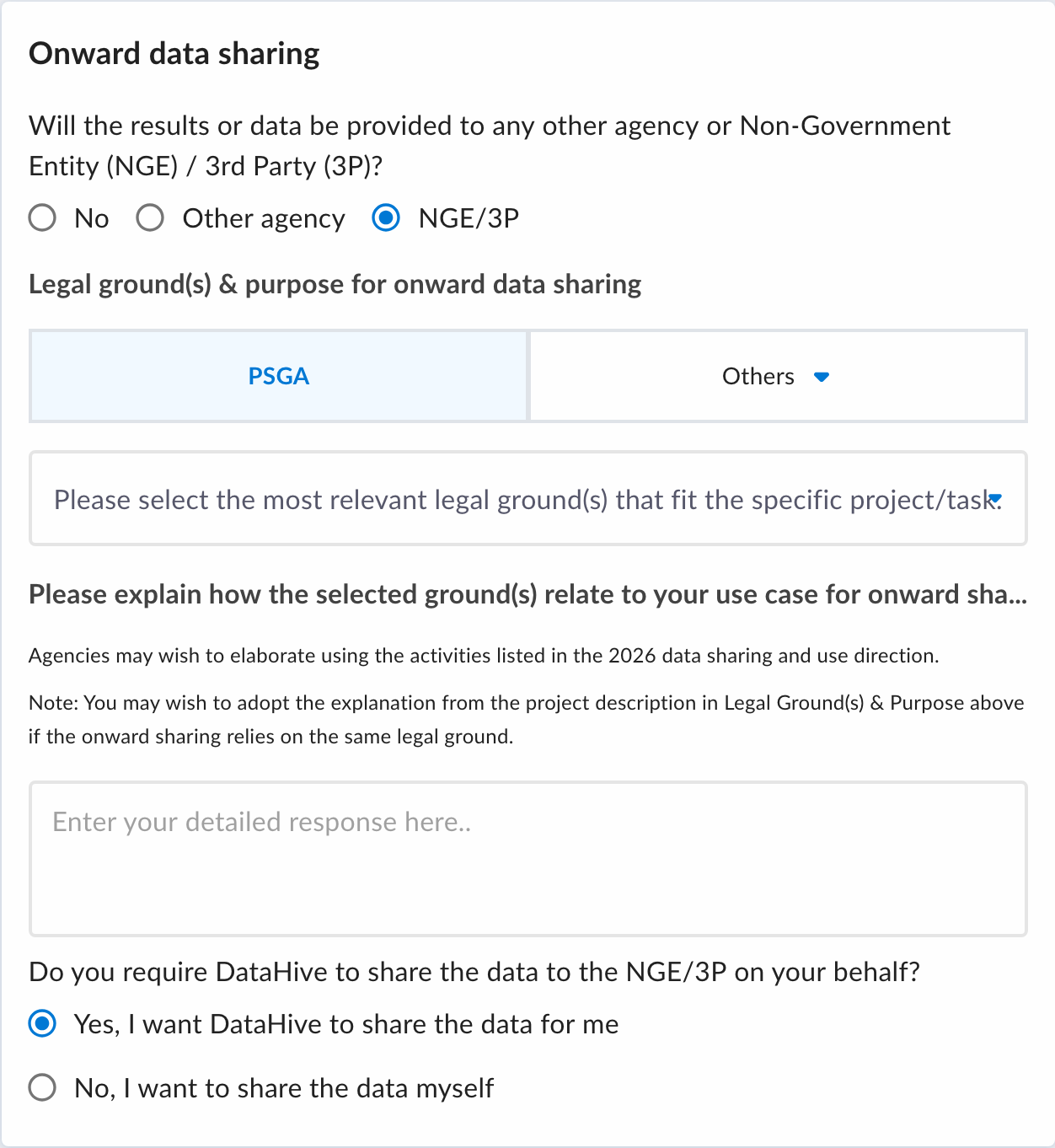
Q: Do I have to appoint DataHive to share the data with the NGE/3P on my behalf?
No, you can choose whether you want DataHive to share the data for you or whether you want to share the data to the NGE/3P by yourself.
Yes, I want DataHive to share the data for me— appoints DataHive as your implementing agent. The NGE/3P's email, public key and public IPv4 address / address range become required, along with a request expiry date.No, I want to share the data myself— your agency distributes the data to the NGE/3P. Those technical details and the expiry date are not needed for this purpose.
Either way, your agency remains responsible for the legal basis of the onward sharing and the Terms of Use imposed on the NGE/3P.
Q: Why does the form ask for a legal ground twice?
The ground in Legal ground(s) & purpose covers your own agency's access to the data. The ground in Onward data sharing covers the onward sharing to the recipient. They are recorded separately and may differ.
Q: What value should I fill in the "Data Controller" field?
The value of the Data Controller field should be the Agency of the Requestor.
Q: Can the receiving entity be an individual?
Yes. You may request to share the data to any individual, provided that the requesting (aka sponsoring) agency has imposed and undertaken the same relevant Terms of Use/IM8 Data Protection policies. The requesting agency should be reminded and needs to remind the NGE/3P that the NGE/3P remains accountable under the Official Secrets Act (OSA), PSGA, and any Terms of Use imposed.
Q: What would be the UEN of an individual?
The UEN of an individual is the NRIC number of the individual.
Q: Whose email should I fill for the email of NGE/3P?
You can fill in the email address of a valid representative contact from the NGE/3P. He/she will be receiving status updates (fulfilled/revoked/expired etc.) on the data request as well as the API access guide on behalf of his/her organisation through the specified email address.
Q: What is the public key used for? How should I provide its value?
Please refer to the key-pair generation guide here. You may screenshot or save this page as PDF to share with the NGE/3P for guiding them on key pair generation. After they have generated the key pair, please ask them to share their public key with you. You may choose to either upload the public key file or key in the raw value in the textbox.

Q: Should the NGE/3P also share their private key with DataHive?
No. The private key needs to be kept securely by the NGE/3P themselves. It should not be shared with any other parties. In case the NGE/3P accidentally shared their private key, please advise them to generate a new key pair, and the previous key pair should not be recycled.
Q: What values should I put for the public IPv4 address / address range for firewall whitelisting? Why is this needed?
For security concerns, we will limit the access to our data sharing API endpoint by whitelisting the NGE/3P’s public IP addresses in our firewall. Please ask the NGE/3P to share their public IPv4 address/range for whitelisting.
The permitted values could be an individual address (e.g. 1.1.1.1), a range of addresses (e.g. 1.1.1.1-2.2.2.2), or a CIDR block (e.g. 1.1.1.0/24). Multiple inputs are allowed. Please press Enter on your keyboard after each input.
Please provide the full IP address range and/or subnet if NGE has a dynamic IP address. NGE/3P can consult their IT department to obtain this info if unsure.

Q: Can I share data to more than one NGE/3P in one DR?
If you do not require DataHive to share the data on your behalf, you can specify more than one NGE in the Name field. If volunteers are included, indicate that the data will be shared with volunteers.
However, if you require DataHive to share the data with the NGEs/3Ps on your behalf, you must create a separate data request for each NGE/3P.
Onward sharing on PSGA legal ground(s)
Q: What is the "Pending Minister Authorisation" status?
Any data request involving onward sharing to an NGE/3P on PSGA legal ground(s) will be held at "Pending Minister Authorisation" after the "Pending Datafields Review" stage. No data is released to the NGE/3P while it is in this state until further action from the data request's owner.
As the data request owner, you must submit the "Authorising Agency Declaration" to release the hold. Data requests involving onward sharing to an Other agency, or to an NGE/3P on non-PSGA legal ground(s), will not be held at this stage.
Q: What is the Authorising Agency Declaration?
It is a two-part attestation by your agency, as the Authorising Agency, confirming that:
- Further authorisation has been obtained from the Minister or the Minister's delegate in accordance with Cl 3.6 of the IM8 Data Access and Distribution domain, for sharing the requested data with the specified NGE on PSGA legal ground(s); and
- Terms of Use have been imposed on the NGE through contractual clauses governing the handling and processing of the data, duly executed and in force before any data sharing commences, in accordance with Cl 3.8.
Both clauses must be acknowledged before the declaration can be submitted.
Q: Who can submit the declaration?
Only the data request owner. Internal Approvers, Tenant Admins and platform administrators cannot submit it on the owner's behalf. If the declaration needs to be made by someone else, transfer ownership of the data request first.
Q: Where do I submit it?
As the data request owner you will see an Action required: Pending Authorising Agency Declaration banner on your data request page, and a Complete declaration button on the data request row under the Requests tab. Both open the same declaration form.
Q: Can the declaration be undone?
No. The declaration is final. Once submitted, the data provider(s) of the requested dataset(s) and the NGE are notified and the data request proceeds to provisioning. The declaration is recorded against your email and the time of submission, viewable in the data request's status history.
After data request approval
Q: Do I need to implement the data sharing by myself? How will the data be provisioned to NGE/3P?
If you had selected Yes, I want DataHive to share the data for me, you do not need to implement the data sharing by yourself. DataHive will provision the requested data on behalf of the requesting agency to the NGE/3P upon fulfillment of the data request.
The NGE/3P will receive an email with an access guide attached to guide them on how to make requests to DataHive’ API endpoint for getting the links to download the requested data after the data request status is reflected as fulfilled.
However, if you had selected No, I want to share the data myself you will need to implement the data sharing with the NGE/3P by yourself.
Q: My data request has expired. Can I request for extension for the NGE/3P?
No. The NGE/3P is only allowed to use the data within the period specified by the Requestor in the data request. The Requestor is to ensure that the NGE/3P deals with the data after the expiry date of the data request as per IM8/IT Mgmt/Data-Access-and-Distribution Cl 2.2/S2, which includes “purg[ing] the data when it is no longer needed”.
If the NGE/3P wishes to continue using the data, the Requstor has to raise a new data request and get it approved. Please make sure that the new data request covers the FULL intended usage period by the NGE/3P. To avoid having to fill up every field again, the Requestor may choose to make a copy of their original request by clicking this button.
