User Setup
This guide will help you get started with creating a service principal account and establishing a secure system connection to DataHive's API and DataHive's Data Warehouse.
There are differences between this feature vs the interactive API connection as defined here. The differences are listed below:
| Interactive API Connection | System Connection | |
|---|---|---|
| Identity | The identity of the user is tied to an interactive user in WOG Entra ID. | The identity of the client is tied to a public/private keypair, stored by both the client (public/private key) and DataHive (public key). |
| Authentication | The access/refresh token can be retrieved from the DataHive portal. They have a short lifespan of 1 hour and 1 day respectively. | The client retains the private key, while the corresponding public key must be provided to DataHive. Authentication will be performed using the client's public/private key pair. |
Pre-requisite
- An internet/intranet facing system which will be connected to DataHive.
- For Data Request Connection only: A fulfilled Data Request (DR).
Process
There are two types of system connections depending on your use case:
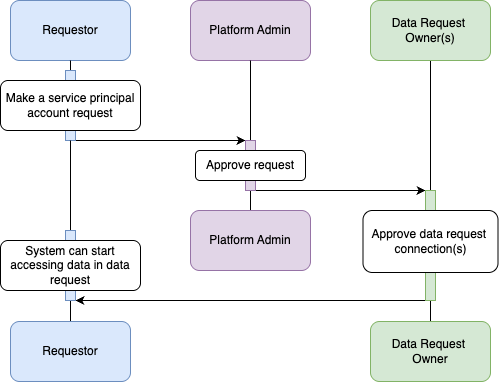
- Data Request Connection - for access to specific datasets via a fulfilled data request.
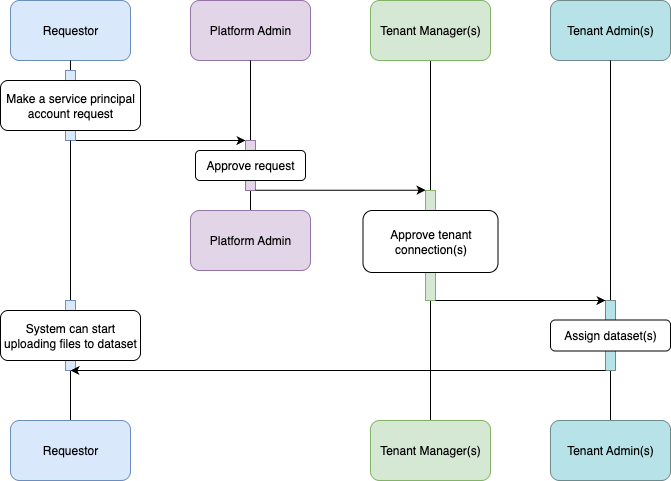
- Tenant Connection - for uploading data to specific datasets owned by the tenant.
Depending on the type of connection requested, the process to obtain a service principal account is illustrated here:
Data Request Connection Approval Flow
Tenant Connection Approval Flow
Connection layout
In a system connection, you have a choice to connect to either DataHive APIs or DataHive Snowflake Data Warehouse.
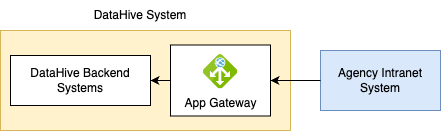
DataHive API is only accessible from the Intranet.
Overview of DataHive API connection:
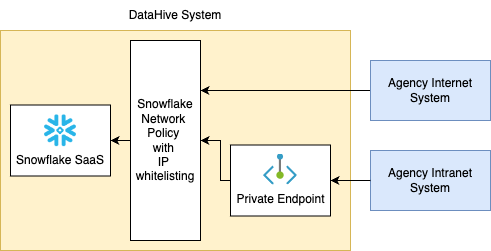
DataHive Snowflake Data Warehouse is accessible from the Internet and Intranet.
Overview of DataHive Snowflake Data Warehouse Connection: