Main and Sub Status
The Data Status Dashboard (DSD) comprises of Main Status(es) and accompanying Sub Status(es).
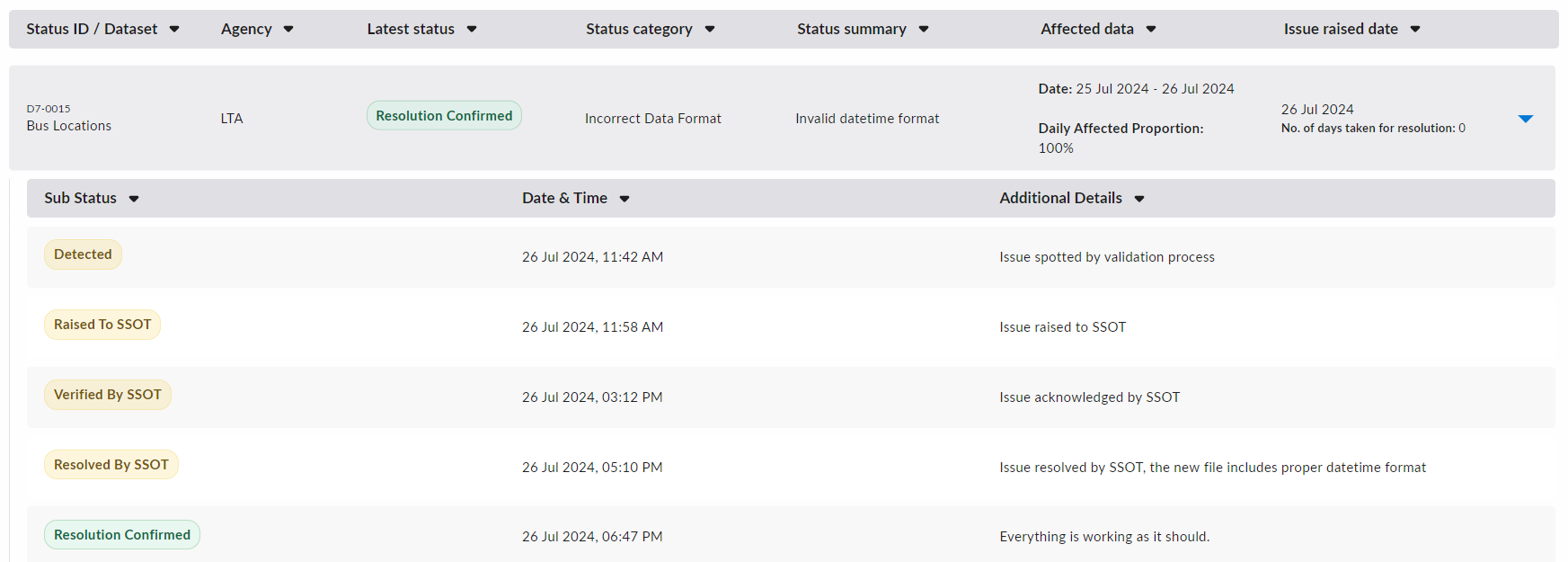
The following is an example of 1 Main Status with 5 Sub Status(es) which represent updates on the original issue.
Main Status
For every data issue raised for a dataset, there will be a single corresponding Main Status.
The Main Status provides an overview of the issue with the following details:
| Field | Description |
|---|---|
| Status ID / Dataset | Status ID (e.g. D7-0015) is a unique identifier for each Main Status.Dataset is the name of the Dataset that the issue arose from. |
| Agency | The agency (SSOT) in charge of the dataset. |
| Latest Status | This is a dynamic field that will display the latest Sub Status.The Sub Status represents updates to the issue being tracked.For more information regarding the Sub Status and its types, refer to the explanation below. |
| Status Category | Refer below for the existing list of Status Categories. |
| Status Summary | A high-level summary of the data issue. |
| Affected Data | Date represents the range of dates for which the dataset is affected.Daily Affected Proportion reflects the proportion of data (on average) for each day in Date that the dataset is affected by the issue. |
| Issue Raised Date | The date that the issue was raised to the SSOT for verification. There will be an accompanying subtext to indicate either: - (i) the number of days taken for resolution (if the issue has been resolved) OR - (ii) the number of days since the issue was raised (if the issue has not been resolved) |
The existing list of Status Categories are:
Missing DataIncorrect Data FormatBSS Threshold Violation
Sub Status
For each Main Status, there can be one or more Sub Status(es).
A Sub Status provides updates on the original data issue. Each represents a distinct stage throughout the process of detecting and resolving data issues.
Each Sub Status contains three fields:
| Field | Description |
|---|---|
| Sub Status | One of several fixed values to indicate the stage being updated in this Sub Status.For more details on the values available, please refer below. |
| Date & Time | The timestamp of the Sub Status update. |
| Additional Details | More information regarding the Sub Status update. |
Sub Status Types
The Sub Status will belong to one of the following fixed types, with accompanying descriptions on what it entails:
| Sub Status Type | Description |
|---|---|
| Detected | When the Tenant Admin detects that there is an issue with the data. |
| Raised to SSOT | When the Tenant Admin formally raises the data issue to the SSOT. |
| Verified by SSOT | When SSOT formally verifies the existence of the data issue. |
| Resolved by SSOT | When SSOT fixes the data issue (For example, by sending updated data). |
| Resolution Confirmed | When the Tenant Admin formally confirms the SSOT's resolution of the data issue. |
| Resolution Rejected | If and When the Tenant Admin formally rejects the SSOT's resolution of the data issue. This can occur if the resolution does not sufficiently address the underlying data issue. |
| Reopened | When the Tenant Admin reopens the underlying data issue after it was previously resolved. |
| Cannot be Resolved | When the Tenant Admin confirms that the data issue cannot be reasonably resolved. |
| Tenant Internal Update | Only viewable for Tenant Admins and Tenant Managers. Details for internal-only updates. |
| BSS Exemption | Alternative path to resolution if the data issue is exempted from BSS standards. |
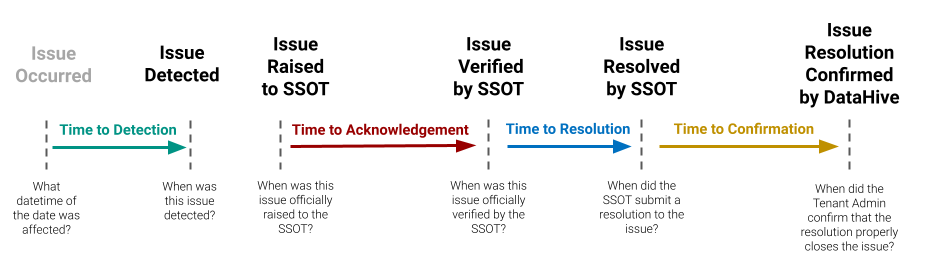
In most situations, the Sub Status pathway to resolving a data issue will look like this: