PowerBI in M365
What is Microsoft PowerBI in M365?
Power BI in M365 service is a Microsoft cloud-based business analytics service that enables any Whole-of-Government (WoG) officers to visualise and analyze data with greater speed, efficiency, and collaboration. It connects WoG officers to a broad range of cloud-based and on-premise data through easy-to-use dashboards, interactive reports and compelling visualizations within the web browser without installing specialised software. For more information visit the M365 PowerBI Community Portal.
How does PowerBI in M365 work with DataHive?
DataHive lets WoG users discover, request and access government-owned datasets. WoG officers with a approved data request can create dashboards, reports and visualizations using the PowerBI M365 Snowflake data connector to DataHive. Please check and consider specific M365 PowerBI Usage Specifications here
Note: PowerBI M365 is supported for data up to Confidential (Cloud-Eligible) / Sensitive (Normal) only, and users are fully responsible for their own usage.
How can I configure PowerBI in M365 to connect to DataHive?
To access your approved data request via PowerBI in M365, you'll need a valid WoG account with MGLP Basket A subscription with access to app.powerbi.com
Long running PowerBI in M365 queries will timeout after 5 mins.
- Click on
Create➕ in the sidebar >Get Data> Search forSnowflake Data Connector - Reference video tutorial
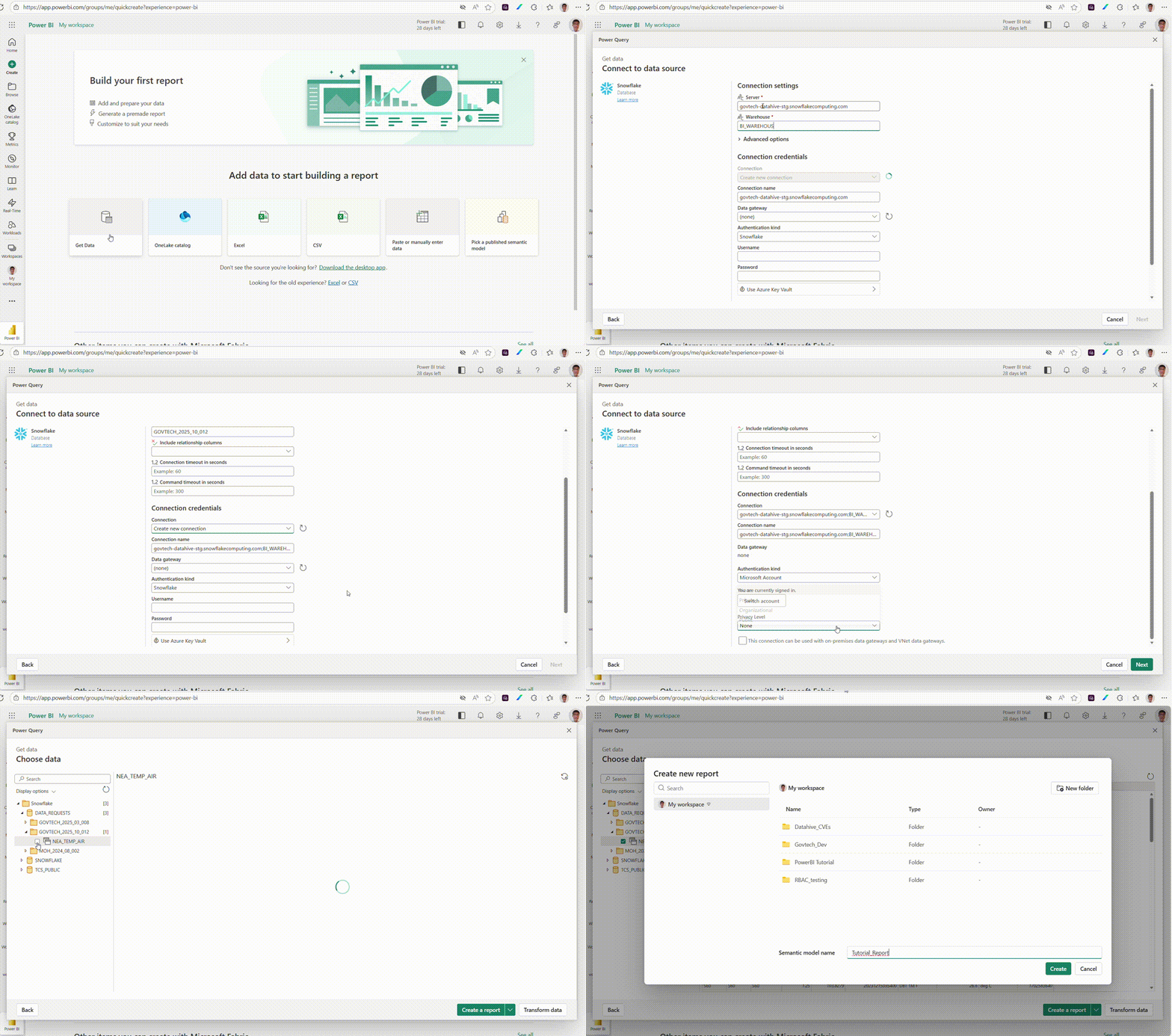
- Use the following configuration settings with your Data Request ID
Connection Settings
| Setting | Value/Selection | Description |
|---|---|---|
| Server | govtech-datahive.snowflakecomputing.com or govtech-datahive-stg.snowflakecomputing.com | The address of the Snowflake server for Production and Staging platform respectively. (Required) |
| Warehouse | BI_WAREHOUSE | The specific warehouse to connect to within Snowflake. (Required) |
Advanced Options
| Option | Value/Selection | Description |
|---|---|---|
| Specify a text value to use as Role name | <DR_ID_replace_dashes_with_underscore> | The specific Data Request ID without dashes (Required) for example if the DR is GOVTECH-2025-10-012 use GOVTECH_2025_10_012 |
| Include relationship columns | (Use Default values) | Option to include columns that define relationships. (blank) |
| Connection timeout in seconds | (Use Default values) | Specifies how long to wait for the initial connection to be established. (Example: 60) |
| Command timeout in seconds | (Use Default values) | Specifies how long to wait for a command (query) to execute. (Example: 300) |
Connection Credentials
| Credential Setting | Value/Selection | Description |
|---|---|---|
| Connection | Create new connection | Action to establish a new connection profile. |
| Connection name | govtech-datahive.snowflakecomputing.com;BI_WAREHOUSE | Auto-generated or custom name for the connection profile. |
| Data gateway | (none) | Indicates no data gateway is being used (for cloud or direct connections). |
| Authentication kind | Microsoft Account | The type of authentication mechanism being used. Do not use Snowflake |
| Privacy Level | Private | Defines the data privacy setting for the source. |
| On-premises connection | (Unchecked) | Box to indicate if the connection uses on-premises data gateways or VNet data. |
🔐 Please remember to Sign in to complete the connection process using your gov.sg Entra ID.