Overview
Occupancy Classification (OC) data product provides occupancy insights based on the fusion of two crucial datasets: Electricity Sales and Water Consumption.
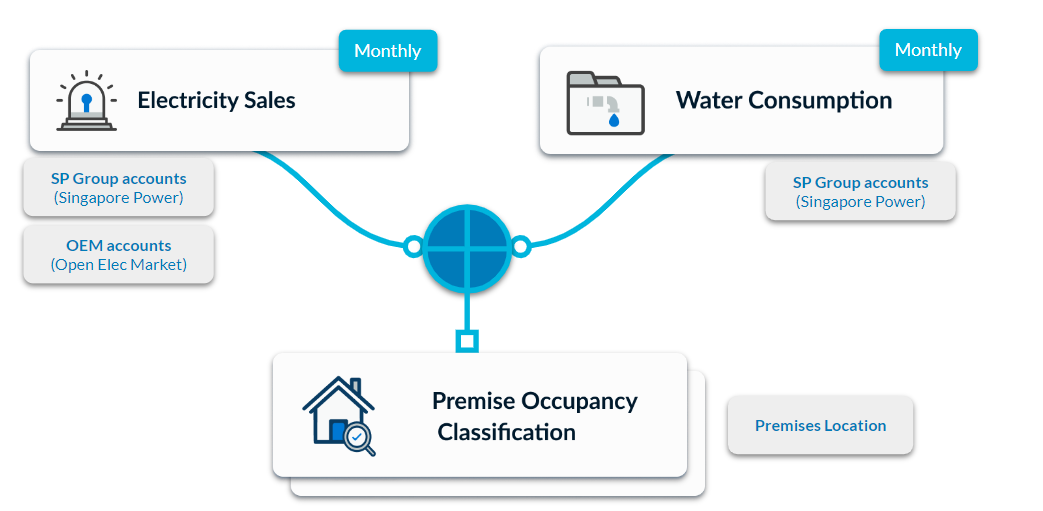
The primary goal is to comprehensively understand and classify the occupancy patterns within buildings and spaces. By combining information on water consumption and electricity sales, the OC data product offers a detailed understanding of how premises are occupied across residential, commercial, and public properties.
Functionality
The Occupancy Classification (OC) data product enables users to:
- Predict whether a premise is Occupied or Vacant
- Prioritise units with high Occupancy through Ranking for Visitation
Some of the example use cases inclues:
- Property inspection
- Estate management
- Occupancy violation investigations
Schema
Below schema is presented with mock data:
| UEN | POSTAL_CODE | LEVEL_UNIT_NUMBER | SUBUNIT | YEAR | MONTH | IS_OCCUPIED | SCORE |
|---|---|---|---|---|---|---|---|
| NULL | 123456 | #10-01 | NULL | 2020 | 01 | TRUE | 0.85 |
| A0123456 | 321123 | NULL | NULL | 2020 | 01 | TRUE | 0.79 |
| FNB123 | 787878 | #01-01 | STALL 1 | 2020 | 01 | TRUE | 0.91 |
Update Frequency
The Occupancy Classification (OC) data product is scheduled to be updated on a monthly basis.
It relies on the insights gathered from Electricity Sales and Water Consumption datasets to ensure the timely availability of accurate predictions.
Field Selection during Subscription
During the subscription phase, please ensure the corresponding dataset fields are selected to gain access to the desired OC data product data fields:
| Occupancy Classification Data Field | Required Fields from Electricity | Required Fields from Water |
|---|---|---|
| UEN | UEN / NRIC | UEN |
| POSTAL CODE | Postal Code | Postal Code |
| BLK HOUSE NUMBER | Block House Number | Block/House Number |
| LEVEL UNIT NUMBER | Level Unit Number | Unit |
| SUBUNIT | Level Unit Number | Unit |
| PREMISE TYPE | Premises Type | Postal Code |
| ENTITY NAME | Account Holder | Account Holder Name |
| SSIC | SSIC | UEN |
| SECTOR | Sector | UEN |
| SUB_SECTOR | Sub Sector | UEN |
For instance, if user desires to obtain the PREMISE TYPE column for the data product, they must select both Premises Type from Electricity dataset and Postal Code from Water dataset during subscription.
After the data product has been subscribed, the underlying fused datasets with selected fields will be made available to the user as well. Users may proceed to the download interface under data requests in order to access those datasets.
Scope filters
Scope filters are applied at the data product level. It will then be applied to the underlying water and electricity datasets.
The following scope filters are available for occupancy classification:
- District Number
- Region Name
- Planning Area Name
- Subzone Name
- UEN
- Postal Code
- Block/House Number
- Level Unit Number
- Sector
- SSIC
- Premise Type
For example, to retrieve only household data, apply the Sector scope filter and select Households.