Data Lineage Records
Tenant Admins, Tenant Managers, Source Agency Users, and Platform Admins can download the data lineage records of a dataset.
In compliance with IM8 Data Security Clause 1.14, tenant admins, tenant managers, and source agency users (SSOTs) can download data lineage records on DataHive, for purposes of identifying any unauthorised access, usage or modification of data.
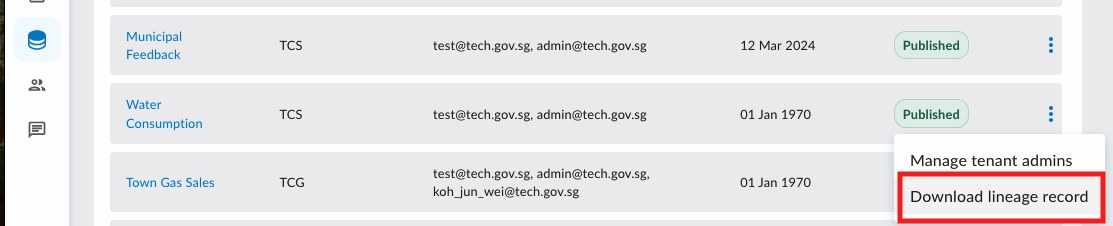
To access the Data Lineage Record, navigate to "Manage datasets" under the "Datasets" tab and click on the ellipsis icon associated with the dataset, then click "Download lineage record".
Record Fields
The Data Lineage Record file contains the following sheets.
Dataset Metadata Records
| Field | Description |
|---|---|
| modified_datetime | The datetime that the metadata was updated. If no changes were made after dataset was published, this date will be the date of publication. |
| modified_by | The email of the officer who updated the metadata. If the dataset was published before data lineage records were kept, this is set to admin@datahive.gov.sg. |
| dataset_id | The dataset ID displayed on the portal. |
| name | The dataset name displayed on the portal. |
| domain | Domain of the dataset selected by the tenant. |
| category | Category of the dataset selected by the tenant. |
| sub_category | Subcategory of the dataset selected by the tenant. |
| rcst_ident | RCST of the dataset when identifiable. Either of the following: Official (Open), Official (Closed), Restricted, Confidential (Cloud Eligible) |
| isf_ident | ISF of the dataset when identifiable. Either of the following: Non-Sensitive, Sensitive (Normal), Sensitive (High) |
| rcst_deident | RCST of the dataset when de-identified. Either of the following: Official (Open), Official (Closed), Restricted, Confidential (Cloud Eligible) |
| isf_deident | ISF of the dataset when de-identified. Either of the following: Non-Sensitive, Sensitive (Normal), Sensitive (High) |
| description | The description of the dataset. |
| source_agency | A list of SSOT agencies. Separated by commas. |
| ssot_assignees | A list of SSOT emails. This will allow us to route the request of NFT fields to them. |
| sensitive_data_fields | A list of data fields in dataset with ISF classification (Identifiable) classified Sensitive High and above. |
Data Consumers
| Field | Description |
|---|---|
| request_id | The data request ID of a data request that includes this dataset. |
| request_by_name | Name of DR requestor. |
| request_by_email | Email of DR requestor. |
| owner_email | Email of DR owner. |
| team_emails | Emails of DR team members. |
| agency | Agency of DR owner. |
| purpose | Purpose of DR. |
| fulfilled_on | Datetime that DR was fulfilled. |
| status | Status of DR. DRs pending approval are not included. |
| expiry_date | Date that DR expired. |
| access_to_databricks | Either of the following: Yes / No. |
| nge_name | Name of NGE. If blank, data is not onward shared to NGEs. |
| nge_email | Email of contact at NGE. If blank, data is not onward shared to NGEs. |
| data_fields | A list of data fields in the dataset requested by the DR requestor for that dataset. |
| from_date | Start of the datetime range of data requested. |
| to_date | End of the datetime range of data requested. |
| spn_connections | A list of systems identified by their Service Principal Names (SPNs) that can access the dataset in fulfilled data requests. An SPN is a system identity that enables programmatic access to datasets.
|
Data Access - Download
| Field | Description |
|---|---|
| request_id | The data request ID of a data request that includes this dataset. |
| curation_id | The download job ID. |
| curation_reference_id | This should be the same as the dataset ID. |
| curation_created_by_name | DR team member or service principal account that triggered the download. |
| curation_created_by_email | Email of the team member who triggered the download. |
| curation_created_on | Datetime that the team member triggered the download. |
| curation_state | State of the download job. |
| curation_start_date | Start of the datetime range of data downloaded |
| curation_end_date | End of the datetime range of data downloaded |
Data Access - Queries
| Field | Description |
|---|---|
| user_id | For interactive users on the DataHive portal, this will be the email of the data request team member. For SPN, this will be the ID of the SPN which has a data request connection with a data request that includes this dataset. |
| user_name | For interactive users on the DataHive portal, this will be the name of the data request team member. For SPN, this will be the name of the system identified by the SPN. |
| user_type | The type of user that triggered the queries. Portal: interactive users on the DataHive portal. SPN: a system identified by the Service Principal Name that has a connection to the data request. |
| request_id | The data request ID of a data request that includes this dataset. |
| agency | For interactive users, the agency of the user. For SPN, the agency of the system identified by the SPN. |
| cdo_team | The CDO team with oversight of the system identified by the SPN. |
| query_volume | Number of queries made by the user in the reference period (month). |
reference_period¹ | The reference month in MM-YYYY format. |
¹ Query records are only available from September 2025 onwards. The
reference_period field will therefore only contain values
starting from 09-2025.