Manage Access to Data Request
As a data request owner, you can:
- Add / Remove team members
- Change data request owner
More information can be found here.
Approve / Reject Team Access Changes
The internal approver will need to approve/reject "Team Access Requests" submitted by data request owners. To do so, go to the approval page, click into the respective data request, and click on the Team access tab.
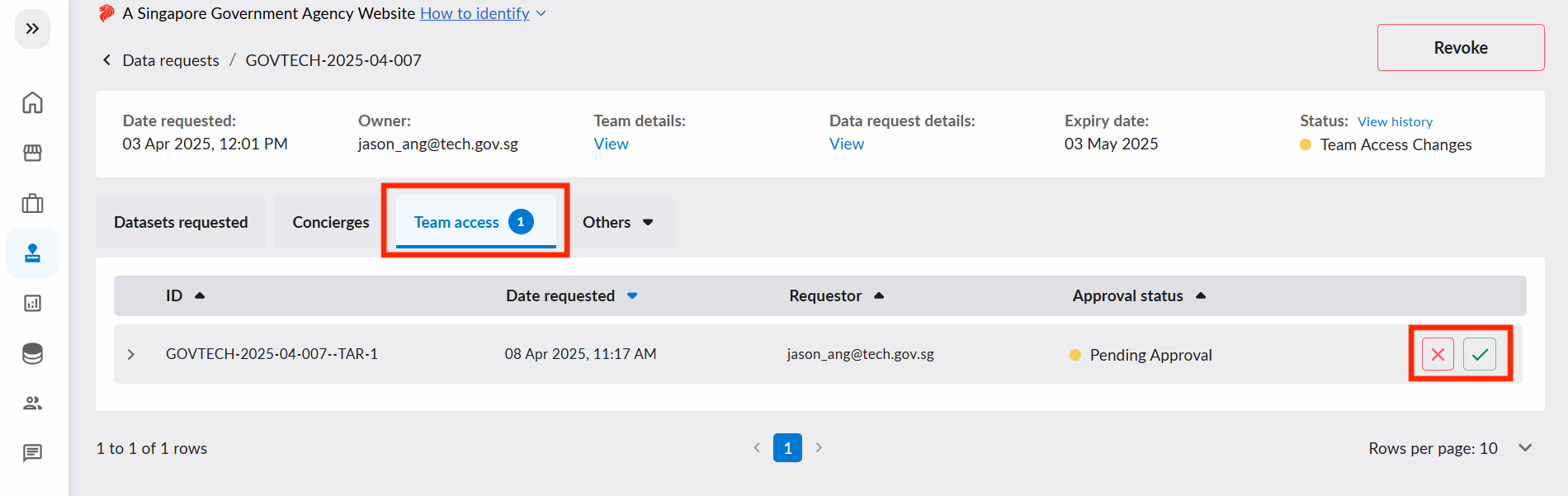
Once approved, the following users will receive notification emails:
- If data request owner is changed, the new and previous owner will be notified
- If there are addition of team members, the newly added members will be notified
Edit Team Access as Internal Approver
Internal Approvers can edit team access for data requests, including changing the Data Request Owner.
This feature is only available to internal approvers with unexpired data requests that:
- Are at the "Request Fulfilled" stage; and
- Have no pending Team Access Requests
Internal approvers should only resort to using this feature in the event that data request owners are not able to edit the team (e.g. when data request owners are no longer valid). Otherwise, please get the data request owner to edit the team according to the View, Add or Remove Team Members section here.
To do so, go to the approval page and navigate to a data request's approval page. Under Team details, click on View to bring up the edit team dialog.