API Access
Sample API Script
The provision of this sample script is meant as an aid for NGE/3P users to make authenticated calls to DataHive APIs.
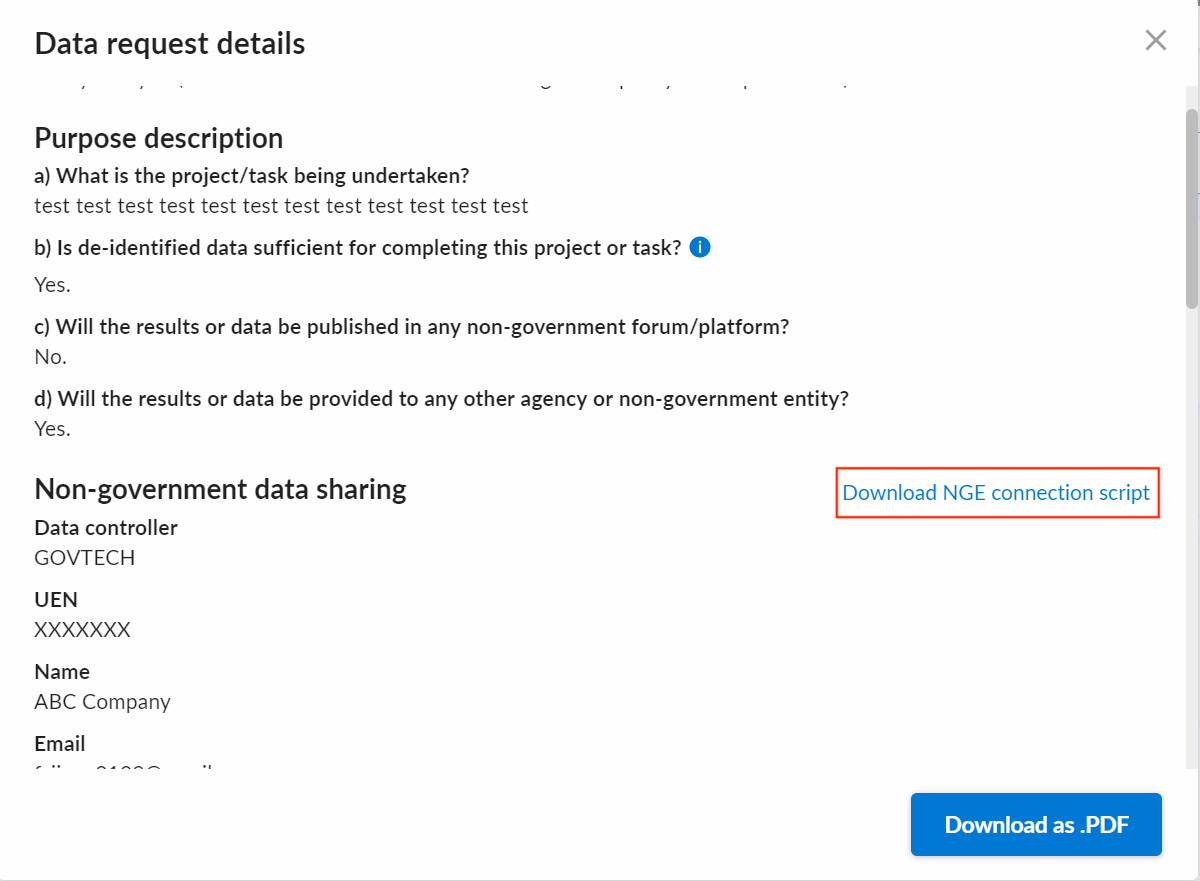
DR owners can download the sample script from the "Data request details" pop up as shown below. The same copy of sample script will be attached in an email sent to the NGE/3P user upon DR fulfilment.
- Please read and understand the usage of the files as described in this section, especially on handling of
config.jsonfile. - Usage of this script in either development or production systems is at the user's discretion.
By extracting the zip file downloaded from the highlighted link or the email attachment, you will find 3 files in it.
| File name | Description |
|---|---|
| api_script.py | This is the main script that you run to call the DataHive API. |
| requirements.txt | This file contains the list of python dependencies needed to run the script. |
| config.json | This file contains the configurations and credentials (user and account IDs) required to run the script to make authenticated calls to DataHive APIs. ⚠️ As this file contains your credentials, please adhere to the following rules when handling this file:
|
To run the script, ensure you have python installed and then run the following command to install dependencies:
python -m pip install -r requirements.txt
Move your private key rsa_key.p8 to the same folder as the sample script.
Configure the private key passphrase in your environment if your private key is encrypted. If your private key is unencrypted, you can skip this step.
export PRIVATE_KEY_PASSPHRASE='<passphrase>'
Then run the following command:
python api_script.py